Free License available – Click Here
Daily Profit & Loss Limit (Day Limit)
The Day Limit feature is a simple guardrail that helps you stop trading when the day has already done its job — before emotions turn one normal day into multiple unplanned trades.
Key idea: This feature does not create signals. It protects your process by enforcing the limits you set.
1) The real problem this feature solves: Overtrading
Most traders don’t lose money because they have no strategy. They lose money because they trade too much in one day — especially after emotion kicks in. This usually shows up in normal situations that happen to almost everyone.
Scenario 1 — “I’ll just take one more trade”
You start the day strong: two clean trades, good execution, and you’re already up. You tell yourself you’ll stop soon… but the market is still moving and you feel confident, so you take “one more” setup. It loses.
Now the day doesn’t feel like a win anymore, so you take another trade to “get it back.” Before you realize it, a profitable morning turns into a flat day — or even a losing day — not because your strategy failed, but because you stayed in the market after you already had a good result.
Scenario 2 — Revenge trading after a loss
Your first trade of the day gets stopped out. It’s not even a big loss, but it hits your mood immediately: annoyed, impatient, and wanting to “fix it fast.” You jump back in too quickly, forcing a trade that isn’t really A+ quality.
If that one loses too, the pressure ramps up: you start chasing moves, entering late, widening stops, or increasing lot size just to recover. What should have been one normal loss turns into a messy chain of trades driven by emotion.
Why willpower fails (even for experienced traders)
- Discipline drops when emotions rise.
- Confidence after a win can be as dangerous as frustration after a loss.
- Fatigue, pressure, and “I can recover it” thinking changes decision-making.
- Self-control works sometimes — but not consistently in live markets.
2) The practical solution: Daily Profit & Loss Limit
A Daily Limit is not about restricting you. It is about protecting you from your worst decisions on your worst days — and your best days.
You set three values:
- Start Balance (baseline for the day)
- Daily Profit Limit (how much profit you want to lock in)
- Daily Loss Limit (the maximum loss you accept for the day)
Once Profit Limit or Loss Limit is reached → the EA stops trading for the rest of the day. This removes debate and emotion at the most dangerous moments.
3) How to enable and set it up
- Open EA Properties.
- Set: Enable_Day_Limit = true
- Click OK.
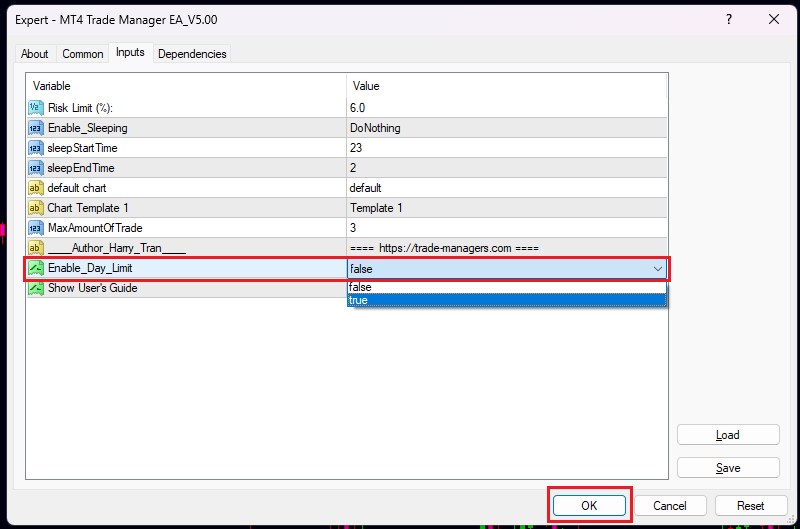
Important rule: Profit Limit and Loss Limit must both be greater than 0. If Profit Limit = 0 or Loss Limit = 0 → the Day Limit is considered NOT SET.
4) What each field means (examples)
Start Balance (USD) — baseline used to measure today’s result.
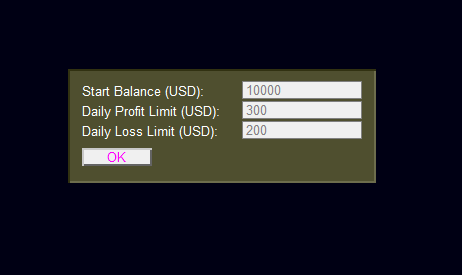
Example
Start Balance = 1,000
If later balance becomes 10,300 → daily result = +300
If later balance becomes 10,800 → daily result = -200
Daily Profit Limit (USD) — how much profit you lock in before stopping.
Example
Profit Limit = 300
When daily result reaches +300 → EA stops trading today.
When your equity reaches the profit target, the EA notifies you clearly and prevents new entries, so you don’t give profits back by taking “one more trade”.
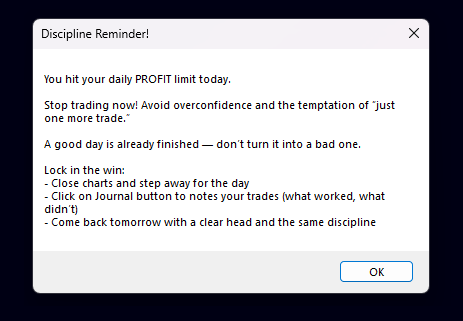
Daily Loss Limit (USD) — maximum loss you accept for the day.
Example
Loss Limit = 200
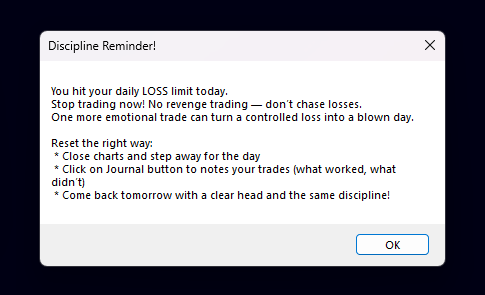
When daily result reaches -200 → EA stops trading today.
When your equity reaches the loss limit, the EA alerts you and blocks new entries, helping you avoid revenge trading and protect the account for tomorrow.
5) Disable / Enable again
Disable (clean reset): Open EA Properties → set Enable_Day_Limit = false → OK.
Enable again: Set Enable_Day_Limit = true → OK, then re-enter limits for the day.
6) Best practice
- Set your Day Limit before you start trading.
- Stop trading when the day has already done its job.
- Let your strategy work across many days, instead of forcing results in one day.
Simple rule:
Turn OFF = reset
Turn ON = configure & protect
Thanks for reading!
Back to Welcome ||
Back to Entry Dashboard


 MT4 Trade Manager EA