Free License available – Click Here

A trendline is a technical analysis tool commonly used in forex trading to identify and analyze market trends. Traders use trendlines to identify areas of support and resistance, which can help to determine potential buy and sell points. By analyzing price movements in relation to the trendline, traders can gain insights into the strength of a trend and the likelihood of its continuation or reversal.
One well-known strategy to place a position once price crosses a trendline is the breakout strategy. This strategy involves identifying a trendline and waiting for the price to break through it before entering a position in the direction of the breakout.
To increase the probability of a successful breakout trade, traders may also use other indicators or technical analysis tools, such as volume or momentum indicators, to confirm the strength of the breakout signal.
Hereafters are steps to setup for a Trendline breakout entry on the EA (refer above screenshot):
Step 1: Select a suitable Stoploss Option.
Step 2: Click on “TrndLine” button to draw a trendline on chart, then move it to a target positon.
Step 3: Click TrdBuy/TrnSell to enable a waiting Buy/Sell order accordingly. Now, traders can leave their trading desk – no need to keep watching the chart, EA will automatically place an order as soon as price closes above/below the target price for a Buy/Sell order respectively.
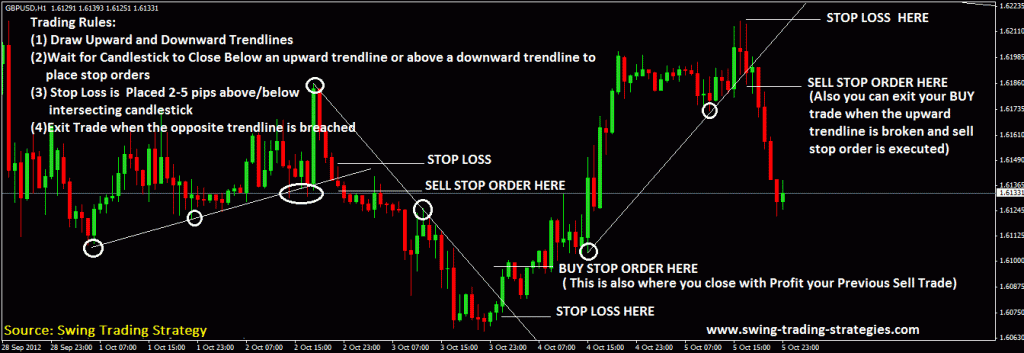
There are a wide range of Trendline Breakout strategies can be found on Google, below is a leaf in a forest for your reference.

Do not hesistate get take MT4 Trade Manger EA free here.
Thanks for reading !
Back to Welcome || Back to Entry Dashboard || Next to “Reversal Pattern Entry“
 MT4 Trade Manager EA